Create CloudFront for Backend (ALB)
Create a CloudFront Distribution for the Backend
ℹ️ Objective
- Amazon CloudFront is a content delivery network (CDN) service that speeds up the distribution of web content (like APIs, videos, and data) to end-users with low latency and high transfer speeds.
- In this architecture, CloudFront will serve as the public “gateway” for our backend API, instead of accessing the ALB directly.
- Key Benefits:
- HTTPS Termination: CloudFront will handle the HTTPS connection from the user. It will then communicate with the ALB over HTTP within AWS’s internal network. This simplifies SSL/TLS management, as we don’t need to configure certificates on the ALB or EC2 instances.
- Increased Performance and Reduced Latency: CloudFront brings your API closer to users through its global network of edge locations.
- Enhanced Security: It provides an additional layer of protection, masking the ALB, and can be integrated with AWS WAF (Web Application Firewall).
🔒 Execution Steps
1. Start Creating the Distribution
- From the AWS Management Console, search for and select the CloudFront service.
- Click on Create a CloudFront distribution.
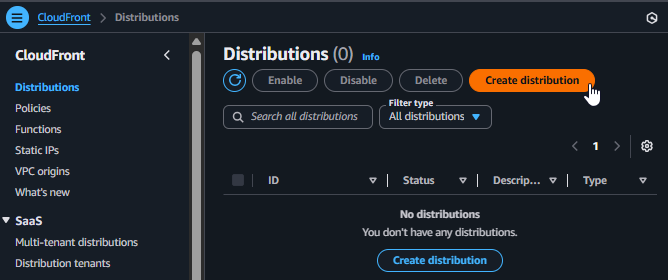
Starting to create a CloudFront Distribution
2. Configure the Origin
- Origin domain: Click the field and select the DNS name of the Application Load Balancer
project-backend-albfrom the dropdown list. - Protocol: Select
HTTP only. - HTTP port: Leave the default as
80.
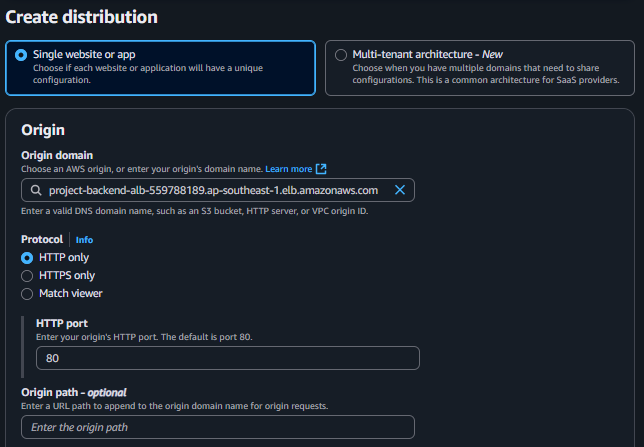
Configuring the Origin as the Application Load Balancer
3. Configure Default Cache Behavior
- This is the most critical configuration part to ensure the API works correctly.
- Viewer protocol policy: Select
Redirect HTTP to HTTPSto automatically redirect users to a secure connection. - Allowed HTTP methods: Select
GET, HEAD, OPTIONS, PUT, POST, PATCH, DELETEto allow all API methods. - Cache policy: Select
CachingDisabled. This is crucial because we do not want CloudFront to cache API responses (which are dynamic). - Origin request policy - optional: Select
AllViewer. This policy forwards all information from the user (headers, query strings, cookies) to the ALB, ensuring the backend receives all the necessary data to process the request.
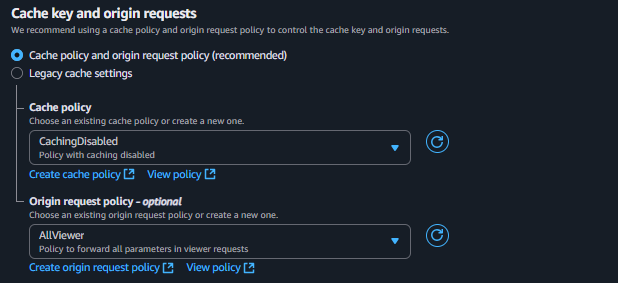
Configuring Cache Behavior for the API
4. Configure Other Settings
- Web Application Firewall (WAF): Select
Do not enable security protectionsfor the purpose of this workshop.
5. Finalize and Test
- Scroll to the bottom of the page and click Create distribution.
- The process of deploying a new distribution across CloudFront’s entire network can take 5 to 15 minutes. You will see the status
Deploying.
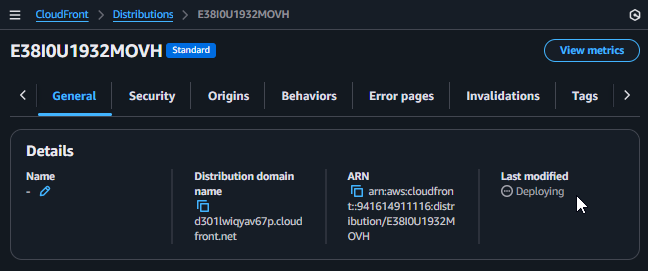
Waiting for CloudFront to complete deployment
- When the status changes to
Enabled(showing the Last modified date), copy the Distribution domain name (e.g.,d12345abcdef.cloudfront.net).
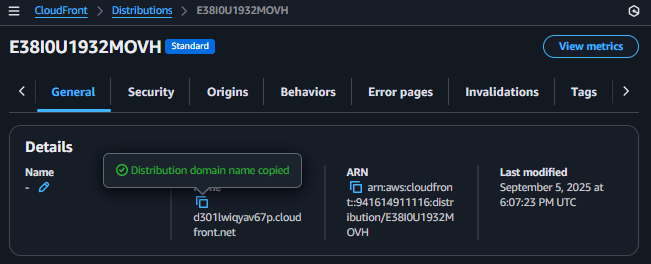
Copying the Distribution's Domain Name
- You will be able to see the result after you connect to the Backend and deploy the project in a later step.
- Paste this domain name into your browser. The returned result should be identical to when you accessed it via the ALB’s DNS:
Backend is running!.